Publishing a Java-based database tool on Mac App Store (MAS)
In the past month, I was working on publishing a Java app to Mac App Store (MAS). It's quite a journey. While Java has come so far in terms of packaging a desktop app, it also lacks in some other critical parts. Sometimes I wonder how others publish to MAS successfully. Did they go through what I just went through?
The published app is Backdoor, which is an open-sourced and modern database querying and editing tool. It also offers a self-hostable version, which is more suitable for a team setting; everyone in your team wouldn't need to install the desktop app.
The desktop version and the self-hostable version share more than 90% of the code through the Java Electron framework, which is analogous to Electron but for Java where you can build the UI using JS, HTML, and CSS and the backend using Java.
Java Electron is the artifact of this blog post. It provides a working example that produces a notarized and TestFlight-approved executable. It even provides a working GitHub Actions workflow for that.
The App Structure
A Java-based Mac app consists of 2 different internal apps: the main app and the runtime aka a mini JVM.
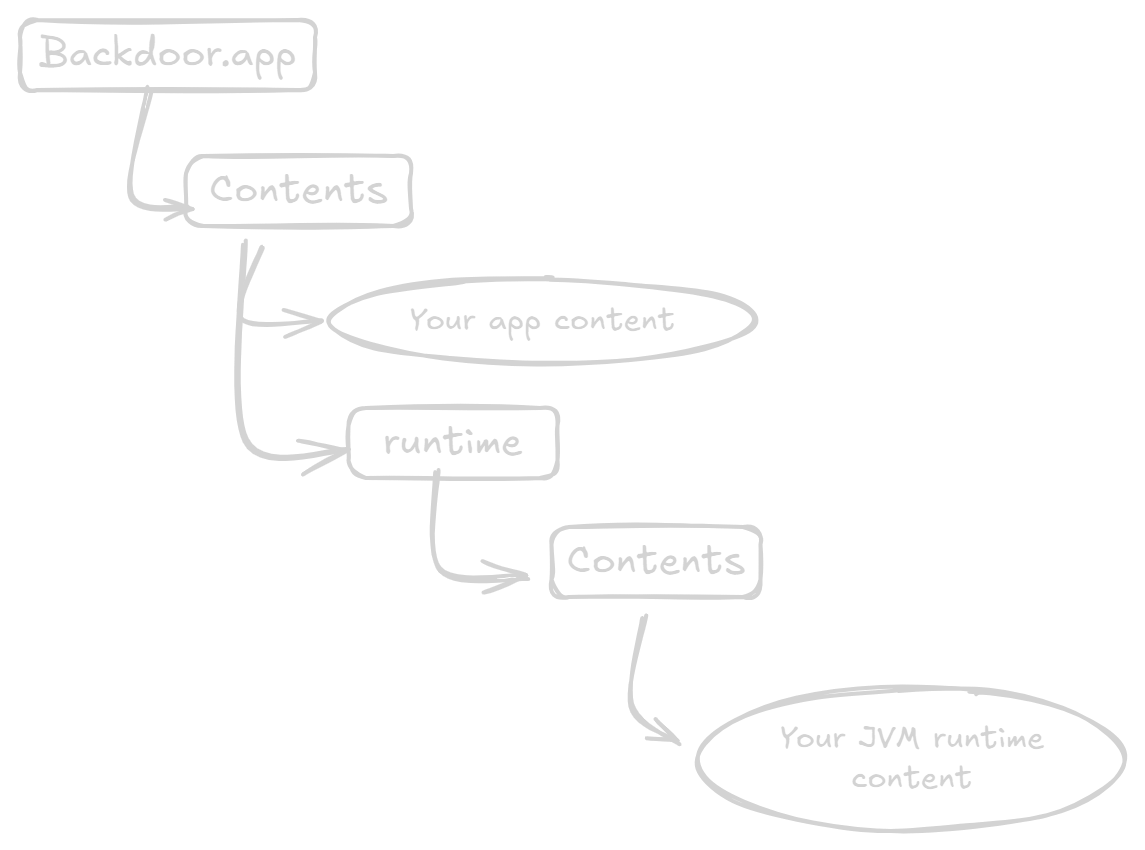
Mac App Store (MAS) requires that an application must not depend on a third-party application. Therefore, a mini JVM is needed in order to run your Java app. This means any Java app would be at least 30MB in size.
The 2 apps are considered distinct because they have different bundle IDs, entitlements, and provisionprofiles. The logic is, if your app bundle ID is tanin.backdoor.desktop.macos, then your runtime bundle ID will be com.oracle.java.tanin.backdoor.desktop.macos..
The logic of bundle ID is baked into the JDK tool, and provisionprofile refers to a bundle ID. The app and runtime content e.g. provisionprofile must be placed at their correct places.
Regarding the entitlement file, at the minimum, your app entitlement should contain the following:
<?xml version="1.0" encoding="UTF-8"?>
<!DOCTYPE plist PUBLIC "-//Apple//DTD PLIST 1.0//EN" "http://www.apple.com/DTDs/PropertyList-1.0.dtd">
<plist version="1.0">
  <dict>
    <key>com.apple.security.app-sandbox</key>
    <true/>
    <key>com.apple.security.cs.allow-jit</key>
    <true/>
    <key>com.apple.application-identifier</key>
    <string>TEAM_ID.tanin.javaelectron.macos.app</string>
    <key>com.apple.developer.team-identifier</key>
    <string>TEAM_ID</string>
  </dict>
</plist>
We need allow-jit because JVM uses JIT. Please note that including allow-jit isn't an issue during the App Store review process.
For the runtime entitlement file, at minimum, it should contain the followings:
<?xml version="1.0" encoding="UTF-8"?>
<!DOCTYPE plist PUBLIC "-//Apple//DTD PLIST 1.0//EN" "http://www.apple.com/DTDs/PropertyList-1.0.dtd">
<plist version="1.0">
    <dict>
        <key>com.apple.security.app-sandbox</key>
        <true/>
        <key>com.apple.security.cs.allow-jit</key>
        <true/>
    </dict>
</plist>
The 2 questions that I have, and I hope some readers can help shed some light:
- Why do we need
com.apple.application-identifierandcom.apple.developer.team-identifier? - Why do we need a separate entitlement for the runtime?
The Tools
There are 2 main tools for packaging the app: jlink and jpackage.
jlink produces a runtime image that is a partial-JVM embedded into your application executable, which is .app in MacOS. You can optionally choose to include only the modules your app in order to minimize the size of your app.
jpackage takes your app jars, the runtime image produced by jlink, entitlements, and codesign certificates; then produces the .dmg file with a launcher script, metadata, and codesigned artifacts.
Unfortunately, on Mac, jpackage doesn't perform codesign correctly nor produce correct metadata. It uses your app entitlement file (not the runtime entitlement) to codesign the runtime image. It doesn't extract or codesign dylibs within jar files. It doesn't add the runtime provisionprofile file to the runtime folder. These gaps would fail the notarization and TestFlight approval process. This is where we need to supply our own custom logic to do so.
Handling Native Libraries
The sandbox imposes the restriction where you cannot run a runtime-generated code. Extracting a dylib from a jar file and using it is considered as using a runtime-generated code.
Handling the native libraries is the most complicated part because you would need to write a custom script that extracts the dylib files and put them under a directory of your own choosing; I've chosen Backdoor.app/Contents/app/resources/ for Backdoor. Then, we would need to figure out how to configure the library to use the dylib from our designated path. If the library doesn't support this kind of configuration, then you will be blocked.
Most libraries like JNA and SQLite support the native path configuration. If the native path isn't configured, then they will automatically extract the dylib from its resources and place the dylibs somewhere accessible. As mentioned earlier, this automatic extraction violates the sandbox. Therefore, we cannot rely on it. For JNA and SQLite, we can extract their dylibs, put it in the path of our choosing, and configure their native paths using jna.library.path and org.sqlite.lib.path. If you use other libraries, then you will need to figure out how to configure its native path.
Placing provisionprofiles
There are 2 provisionprofiles. One is for your app and should be placed at Backdoor.app/Contents. Another is for your runtime and should be placed at Backdoor.app/Contents/runtime/Contents.
A provisionprofile file need its com.apple.quarantine removed. Who knows why we need to do it? But we need to. You can use this bash command: xattr -d com.apple.quarantine <provisionprofile>.
Then, the provisionprofile needs to be codesigned without an entitlement.
Codesigning
There are 3 distinct groups that need to be codesigned.
- Native libraries. The ones within the jar files need to be codesigned as well even though we don't actually use them :S. These should be codesigned without an entitlement. Since a jar file is actually a zip file, you can use the command
unzipto extract the content, codesign all the dylibs inside it, and surgically put the dylib in the original jar file usingjar -uvf <jar_file> -C <extracted_dir> <dylib_path_relative_to_extracted_dir>. - Provisionprofiles. It was mentioned in the previous section.
- Executables. There are 2 executables: one is your app, and the other is your runtime. Your app is
Backdoor.app. Your runtime executable is atBackdoor.app/Contents/runtime/Contents/Home/lib/jspawnhelper. These 2 must be codesigned with their corresponding entitlements.
I've figured all this out through a trial-and-error approach. Apple's notarization validates the app, and we can see the validation results using xcrun notarytool history and xcrun notarytool log. Uploading an app to TestFlight has further validations, and the results will be on your dashboard.
Packaging App for Notarization
After we complete the proper codesigning, we can use xcrun notarytool submit to submit the DMG file. After it passes the notarization, we can optionally "staple" the result into our DMG file using xcrun notarytool staple. Stapling would facilitate the process of validating the app's signature without internet connection. It might be helpful for some of your users.
Uploading App to TestFlight
In order to upload it to TestFlight, we need to convert the dmg file into a pkg file and codesign it with the installer certificate. In Java 21, there's no good way to do it except stringing several command lines together where we extract .app from the dmg file, convert .app to pkg, validate, and upload it. Since Java 24, it seems jpackage can produce .pkg, but I haven't tried.
We can use xcrun altool to upload to Test Flight.
A Working Example
Java Electron is a Java desktop app framework that enables you to build frontend using JS/HTML/CSS. It serves as a working example with Github Actions workflows to notarize and upload to TestFlight.
I've used Java Electron to build Backdoor, which is published on the Mac App Store. Since Java Electron enables me to use JS/HTML/CSS, the self-hostable version of Backdoor shares >90% of the code with the desktop app!
Future work
I'm working toward publishing app on Microsoft Store and deploying app on Linux. I expect it to be much easier given that Windows only requires code-signing on the installer and Linux doesn't impose any requirement or has an official store.
Backdoor is a modern and easy-to-use database tool. It can be used as a desktop app, which is great for personal use. Or it can be self-hosted, which reduces the need for admin dashboard and is great for team use. It supports Postgres, SQLite, and ClickHouse.